Auto detailing website design: examples, the pages you need, and a booking flow that works on a phone
A concept detailing site the studio built, the six things every detailing site needs, and a phone booking flow step by step, with Canadian notes.
 Alex Rowan · Marketing & content, MAXAUTOMATE · Vancouver, BC
Short answerA good auto detailing website shows each package with its price and how long you need the car, a before-and-after gallery, whether you come to the customer or they come to you, add-ons like ceramic coating as a quote, an FAQ about time and weather, and a booking page that asks the vehicle size and lets a customer pick a real time slot on their phone.
Most auto detailing website examples you’ll find are templates: a hero photo of a shiny car, three packages and a “Get a quote” button. The look matters, but whether a visitor books depends on quieter things: pages that answer their questions, and a booking flow that works on a phone. Below: a concept site the studio built, the pages a detailing site needs, and the booking flow step by step.
What does a good auto detailing website look like?
The example I know best is NorthShore Detailing, a concept site the studio built to show what a premium detailing shop can look like online. It isn’t a real business: the footer says it’s a demo by maxautomate.ai, and the phone number is a 555 placeholder. You can open it at detailing.maxautomate.ai.
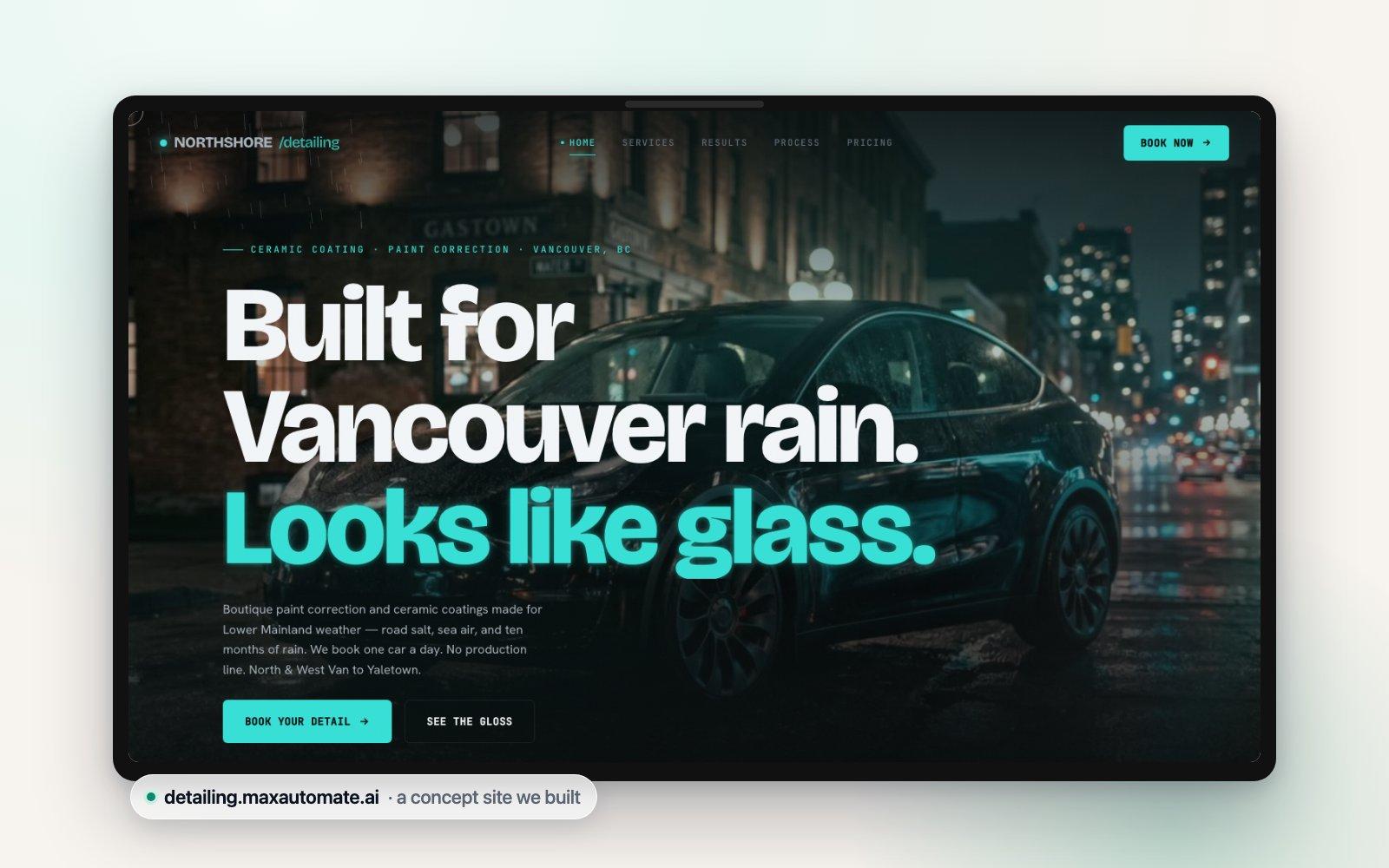
The hero is a short film that plays as you scroll: frames drawn one after another on a single canvas, so the scroll moves the camera. Phones get their own, shorter set of frames, and a loading bar covers the screen until the first frame is ready. We built it to load fast, because a hero that stalls on mobile data loses people before they see a price.
Below it, each service shows a starting price, and ceramic coating says how long it takes (2–3 days). Then a before-and-after wipe, the process (“Four steps. One car a day.”) and three packages with prices. Past the hero, a Book Now button stays in the top bar.
What we’d change for a live shop is the last step. As a concept, NorthShore’s booking ends with a request: “Tell us the car and what’s bothering you and we’ll send back a quote and the next open bay.” That suits a coating job that needs a paint reading first. For fixed-price packages, a live version would open a calendar. More on why below.
Which pages does a car detailing website need?
Six things, each answering a question a customer would otherwise call you about while your gloves are on.
Packages with prices and durations
Show each package with a price, how long you need the car, and what’s included. The time matters as much as the price: a customer needs to know whether to drop the car before work or plan a day without it. If the price depends on vehicle size, show a “from” price with the sizes spelled out.
A before-and-after gallery
Detailing sells on what people can see. Pair each before with its after from the same angle and light, label the service (“two-stage correction”, “interior reset”), and link the gallery from each package.
Mobile, shop or both
Say on the home page whether you come to the customer, they come to you, or both. Mobile: list the areas you cover and what you need on site, like water or power. Shop: give the address, drop-off times and whether there’s somewhere to wait.
Add-ons, with coating as a quote
Small add-ons such as pet hair removal or headlight restoration can be tick boxes with a price. Ceramic coating, paint correction and film depend on the paint’s condition, so show a “from” price and an inspection step instead of a fixed checkout price.
An FAQ about time and weather
Answer the questions you hear every week, in your own words: How long will you have my car? What if it rains on my mobile appointment? How soon can I wash it after a coating? Can you get the salt out of my carpets?
Booking that asks the vehicle size
Size changes the time and the price, so the booking page should ask for it before showing slots: car, small SUV, large SUV or truck, van. Then the calendar only offers times long enough for that vehicle.
What does a car detailing booking flow look like on a phone?
On a phone, a good booking flow asks one thing per screen, in the order the customer thinks about it, and shows a real slot before asking for contact details. Here it is for Granite Auto Spa, a made-up detailing shop for this example.
- Pick a packageEach with a price, the time you need the car and a one-line summary. One tap selects.
- Choose the vehicle sizeCar, small SUV, large SUV or truck, van. The price on screen updates.
- Add extrasTick boxes for priced add-ons. Coating and correction say “we’ll confirm after a look at the paint” instead of a price.
- Shop or mobileDrop-off at the shop, or an address for a mobile visit, checked against your service area.
- Pick a timeOnly slots long enough for that package and vehicle appear, with drop-off and pick-up times together.
- Name, phone and emailAsked last, once they’ve chosen a time, with a separate, unticked box for offers by text.
- Confirmation and reminderA confirmation straight away, and a reminder before the visit that says what to do beforehand.
Why do “request a quote” forms lose customers?
A quote form asks someone to describe their car, then wait. Picture it from their side: they fill in your form late in the evening, nothing comes back until the next afternoon, and meanwhile another shop’s site let them pick a Saturday morning slot.
A quote form also hides the two things they came for: a price and a time. Instant booking shows both, so it fits anything you can price from the package and the vehicle size.
Quotes still have a place: coatings, film and heavy correction depend on the paint, and a good detailer wants to see it first. Even then, let people book the next step instantly, a paint inspection slot or a quote call at a set time, so they leave with something on the calendar.
Car detailing websites in Canada: rain, salt and seasons
Detailing in Canada follows the seasons, and a site that says so reads as local. Worth putting on the page:
- A weather policy for mobile work. On the coast, rain is part of the job for much of the year. Say what happens to a mobile booking when it rains: you work under cover, you move it, or you text the day before.
- Salt season. Where roads are salted in winter, an undercarriage rinse, salt stains on mats and a spring decontamination make natural add-ons. Name them the way customers do: “salt removal”, not “saline residue treatment”.
- Seasonal timing. Protection before winter and a clean-up after it are when people think about their paint. A short seasonal note on the home page with a booking link is enough; change it when the season does.
- Overnight services. If a service keeps the car overnight (NorthShore’s coating step is cured overnight), say so on the package.
What our system includes for a detailing shop
If you’d rather not build this yourself, here’s what our system includes. It’s $299 CAD a month with $0 setup, month-to-month, and you can cancel with 30 days’ notice:
- A website of 1–5 pages with your brand, your photos and your packages
- Online booking with confirmations and reminders
- Missed-call text-back on your business number: gloves on, the caller gets a text and can pick a slot online
- Your client list in one place, imported at launch
- Your Google Business Profile set up and cleaned up, and a review request after every visit
- Follow-ups for no-shows and unanswered enquiries
- A monthly one-page report
The plan includes 2,000 text segments and 500 voice minutes a month; beyond that it’s $0.06 per segment and $0.35 per minute. Site, booking and client list go live in the first week; texts switch on once carriers approve your business number, usually 1–2 weeks. Every text names your business and carries the STOP line, and the consent box on the booking page is never pre-ticked. More on our websites page.
Want to see your shop this way? We’ll build you a free demo site with your name and services within 48 hours of a 15-minute call, no card needed. Or start with a free video audit of the site you have now.
Questions people ask
How do I make a car detailing website?
Start with the pages customers need: packages with prices and times, a before-and-after gallery, your service area or shop address, an FAQ, and a booking page that asks the vehicle size. You can use a website builder, a booking app’s page or have it built; whichever you choose, test the booking on your own phone before you share the link.
Are auto detailing website templates good enough?
A template can look fine; what matters is what you put in it. Check that it has room for packages with prices and durations, a gallery, an FAQ and a Book now button on every page, and that the booking step works on a phone.
Should a detailing website show prices?
Yes, at least as “from” prices by package and vehicle size, because price and time are what a customer needs to decide. Services that depend on the paint, like ceramic coating, can show a starting price with an inspection step.
Can customers book a mobile detail online?
Yes. The booking page asks for the address, checks it against your service area and offers only slots long enough for that package and vehicle. A weather line in the reminder text covers what happens if it rains.
Sources
- NorthShore Detailing: concept site built by MAXAUTOMATE (hero, services, packages and booking step as described) · checked 2026-10-18
- Canada’s Anti-Spam Legislation, S.C. 2010, c. 23: s. 6 and s. 11 (Justice Laws) · checked 2026-10-18
- MAXAUTOMATE: Pricing ($299 CAD/mo, $0 setup, what is included) · checked 2026-10-18